Why Is My 3D Print Stringing? Fix It, Cheapest First
Stringing is plastic oozing during travel moves. Here's how to stop the hairs and webs — temperature and dry filament first, retraction tuning next.
Try these in order (cheapest first)
- Drop the nozzle temperature 5–10°C — Free
- Dry the filament — especially PETG, nylon, and TPU — Free–$30
- Turn on or increase retraction distance — Free
- Raise retraction speed and travel speed — Free
- Enable combing so the nozzle avoids crossing open gaps — Free
- Run a temperature + retraction tower to dial it in — Free
- Replace a worn, leaking, or partially clogged nozzle — $5–$15
Step by step
Step 1: Lower the nozzle temperature first
A too-hot nozzle is the most common cause of stringing. The hotter the plastic, the runnier it is, and runny plastic dribbles out the moment the nozzle stops pushing. Drop the temperature in 5°C steps and reprint. PLA strings less below about 205°C; PETG is far worse hot and usually behaves around 230–235°C; TPU and nylon want the low end of their range. Go too cold and you'll get weak layers and under-extrusion, so stop the moment the strings disappear.
Step 2: Dry the filament before you blame the printer
Plastic absorbs water from the air, and wet filament hisses, pops, and sprays fine strings no amount of retraction tuning will fix. PETG, nylon, TPU, and any spool left open for weeks are the usual suspects; PLA is more forgiving but not immune. Dry it in a filament dryer or a kitchen oven at 45–55°C for PLA, 60–65°C for PETG, for four to six hours. If a fresh, dry spool prints clean and your open one strings, moisture was the problem.
Step 3: Turn on retraction, then increase the distance
Retraction pulls the filament back a few millimetres before each travel move so the pressure at the nozzle drops and plastic stops leaking out. Make sure it's enabled, then raise the distance in 0.5 mm steps. Direct-drive extruders need little — 0.5 to 2 mm is typical. Bowden setups need much more — 4 to 7 mm — because the long tube absorbs the pull. Too much retraction grinds the filament or causes clogs, so increase only until the strings stop.
Step 4: Raise retraction speed and travel speed
How fast the filament is yanked back matters as much as how far. A quick retraction (around 25–45 mm/s) snaps the pressure off before plastic can ooze. Pair it with a faster travel speed so the nozzle spends less time hovering over the gap where a string would form. Most slicers separate "retraction speed" from "travel speed" — bump both. If you hear clicking from the extruder, you've gone too fast and the gears are skipping.
Step 5: Let the slicer avoid the open gaps
Combing (called "avoid crossing perimeters" or "combing mode" depending on the slicer) keeps the nozzle traveling over already-printed areas instead of hopping across open air, so any ooze lands on the part where it won't be seen. Turn it on. If your slicer offers "wipe while retracting" or a small coasting value, those help too — coasting cuts extrusion just before the end of a line so residual pressure finishes it instead of blobbing.
Step 6: Calibrate with a tower instead of guessing
Once you're close, stop changing settings blind and print a calibration tower. A temperature tower prints the same shape at stepped temperatures so you can read off the cleanest band; a retraction tower does the same for retraction distance. Both take twenty minutes and remove the guesswork. Save the winning numbers as a material profile so you never re-tune that spool again — settings are per-filament, not per-printer.
Step 7: Check the nozzle if nothing else works
If the filament is dry, the temperature is right, and retraction is dialled in but one print still strings, suspect the hardware. A partially clogged nozzle drools unevenly, and a worn brass nozzle (abrasive filaments chew them out in weeks) leaks around a widened tip. A loose nozzle that isn't seated tight against the heat break oozes from the threads. Swap in a fresh nozzle — they're a few dollars — and re-run the temperature tower.
Frequently asked questions
- Why is my PETG stringing so badly when PLA prints clean?
- PETG runs hotter, stays runny longer, and soaks up moisture far faster than PLA, so it strings much more easily. Dry the spool first, then print at the low end of its range — many PETG filaments string at 245°C but print clean at 230°C. Slightly higher retraction and combing turned on usually finish the job.
- Does lowering the temperature really stop stringing?
- For most stringing, yes — it's the single most effective fix. Cooler plastic is thicker and oozes less while the nozzle travels. Drop in 5°C steps and reprint until the hairs vanish. The limit is layer strength — go too cold and layers won't bond and you'll see gaps, so stop at the first temperature that prints clean.
- How much retraction distance should I use?
- It depends on your extruder type, not your printer brand. Direct-drive extruders, where the motor sits right above the nozzle, need only 0.5–2 mm. Bowden setups, where filament travels through a long tube, need 4–7 mm to overcome the slack. Start in that range, then adjust in 0.5 mm steps. More is not better — too much causes clicking, grinding, and clogs.
- Is a little stringing normal, or should there be none?
- A few fine wisps you can brush off with your hand are normal and harmless on most prints. Chasing absolute zero stringing can push you so cold that layer adhesion suffers, which is a worse trade. Aim for "no strings I have to cut off," not perfection. Functional parts can tolerate a wisp; display models are where it's worth the extra tuning.
- Will drying filament fix stringing on its own?
- Often, yes — if moisture is the cause. Wet filament strings, hisses, and pops no matter how good your retraction settings are, because steam blows out fine threads as the plastic prints. Dry the spool and reprint before changing anything else. If a fresh, sealed spool of the same filament prints clean and your old one strings, water was the culprit.
Stringing is ooze, not a broken printer
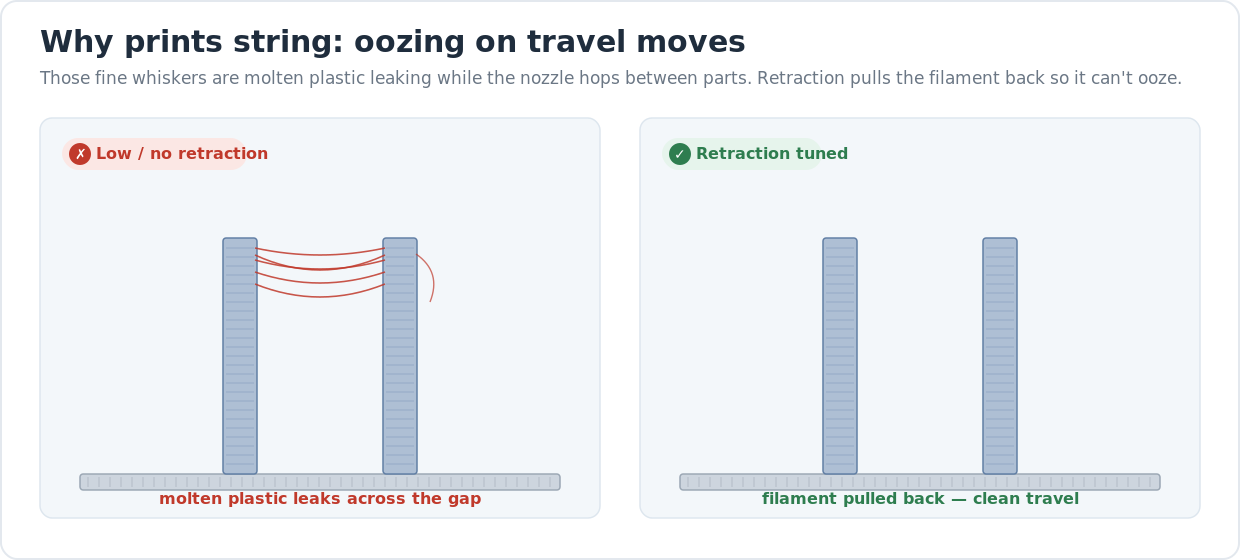
Every time the nozzle lifts to travel between two parts, the molten plastic inside it wants to keep flowing — and if nothing stops it, a thin thread drags across the gap. That’s stringing. The hero diagram above shows the two outcomes: with weak retraction the plastic leaks across the gap and dries into hairs; with retraction tuned, the nozzle travels clean.
So the fixes below are about two things — making the plastic less runny (temperature, dry filament) and stopping the flow during travel (retraction, combing). Work the list in order and change one setting at a time, or you won’t know which fix actually worked. If your print also isn’t sticking or the corners are lifting, that’s a different problem — sort out first-layer adhesion and warping first, because a print that’s already failing at the base won’t tell you anything useful about stringing.
How retraction actually stops the strings
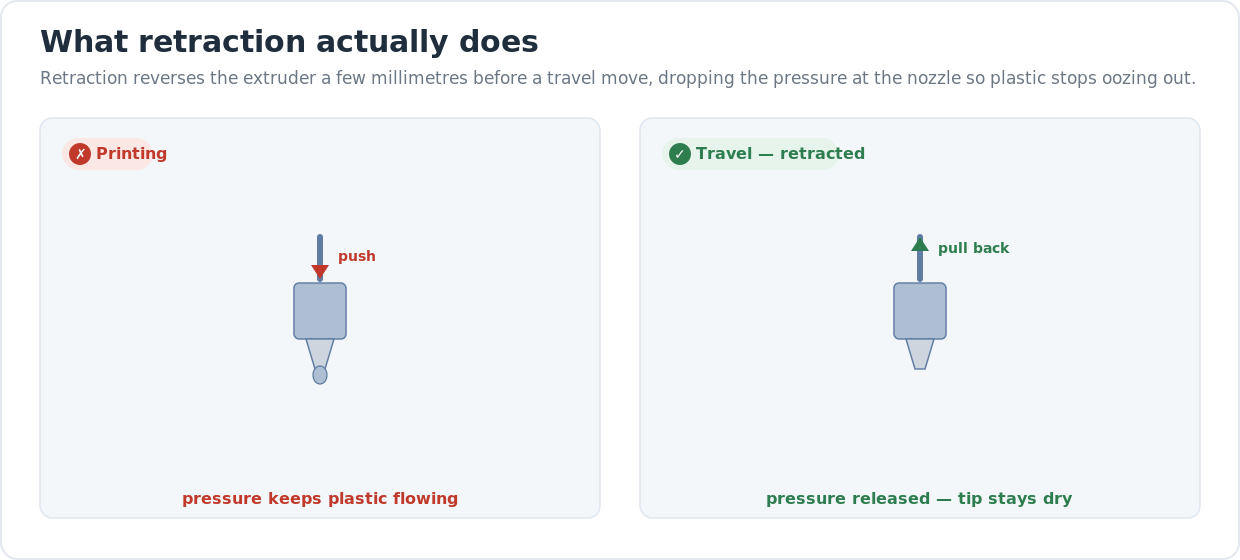
Retraction reverses the extruder a few millimetres right before a travel move. That drop in pressure at the nozzle is what stops the ooze — the plastic is literally pulled back up out of the melt zone so it can’t dribble. Tune the distance to your extruder type (short for direct-drive, long for Bowden) and the speed so the pull happens fast, and most stringing disappears without touching anything else.
When stringing is really a wet-filament problem
If you’ve dropped the temperature and dialled in retraction and a spool still sprays fine hairs — especially PETG, nylon, or TPU — the filament is almost certainly wet. Plastic pulls water out of the air, and that trapped moisture flashes to steam in the hot end and blows out threads no setting can stop. Our how to dry filament guide covers the temperatures and times; in short, four to six hours in a filament dryer or a low oven fixes most of it. And if the filament is dry and the settings are right but one print still strings, suspect the hardware — a partially clogged nozzle drools unevenly during travel and leaves hairs a cold pull will clear.
This is also a buying signal. Printers that run an enclosed chamber and feed from a sealed, dry spool area string far less on fussy materials, and a machine with a well-tuned stock profile saves you most of this tuning out of the box. If you’re shopping, our honest desktop 3D printer buyer’s guide covers which machines print clean without a calibration marathon.
Last updated
Reviewed 2026-06-23. Temperature, retraction-distance, and speed ranges above are starting points across the current FDM machines we cover — your filament’s spool label and your extruder type always win if they disagree. If clearing the nozzle is what fixes it, see our guide to fixing a clogged nozzle.