How to Fix a Clogged 3D Printer Nozzle (Cheapest First)
A clog is a flow problem, not a broken printer. Here's how to clear it — cold pull first, heat and a needle next, hardware last.
Try these in order (cheapest first)
- Tell a partial clog from a full clog before you touch anything — Free
- Do a cold pull (atomic pull) to lift the debris out — Free
- Heat it up and push fresh filament through, clear the tip with a needle — Free–$8
- Rule out heat creep — check part cooling and retraction — Free
- Replace the nozzle — it's a consumable — $5–$15
- Check the PTFE liner and Bowden coupler last — $3–$10
Step by step
Step 1: Tell a partial clog from a full clog first
Diagnose before you disassemble. A partial clog still extrudes, just badly — thin or ragged lines, gaps in the top layers, intermittent under-extrusion, and a clicking or thunking extruder as the gears skip on filament that won't feed. A full clog extrudes nothing: the motor turns, the filament grinds, but no plastic comes out. Heat the hot end to printing temperature and push filament by hand. If a thin or curling stream appears, it's partial; if nothing moves with firm pressure, it's full. That tells you how hard you'll have to work.
Step 2: Do a cold pull to lift the debris out
The cold pull (also called an atomic pull) is the cheapest fix and clears most clogs without taking anything apart. Heat the hot end to printing temperature, push filament in until it extrudes, then drop the temperature. For PLA, let it fall to about 90°C; for PETG and ABS, around 110–120°C. When you hit that window, grip the filament and pull it out firmly in one motion. It comes out as a cone-shaped plug carrying the debris that was blocking the channel. Repeat two or three times until the pulled tip comes out clean and cone-shaped with no dark flecks.
Step 3: Heat it up and push fresh filament through
If the cold pull didn't fully clear it, attack the clog hot. Bring the hot end to the top of the filament's range — around 220°C for PLA, 250°C for PETG — and push filament through hard by hand to force the softened blockage out the tip. For a stubborn tip blockage, feed a 0.4 mm cleaning needle (or a single strand of acupuncture wire) up through the nozzle orifice from below while it's hot to break the plug loose, then push filament through to flush it. Never force a cold nozzle — you'll strip the extruder gears or snap the filament off inside.
Step 4: Rule out heat creep before you blame the nozzle
If clogs keep coming back mid-print, the cause is usually heat creep, not a dirty nozzle. Heat creep is heat climbing up past the heat break and softening filament before it reaches the melt zone, where it swells and jams. The fixes are upstream — make sure the hot-end cooling fan actually spins and isn't choked with dust, that the heatsink fins are clean, and that the heat break is tight. Excessive retraction pulls molten plastic up into the cold zone where it sticks, so back off retraction distance if you've cranked it. Printing too slow on high-temp materials bakes the filament in the throat too.
Step 5: Replace the nozzle — it's a consumable
If a cold pull and a hot push won't clear it, stop fighting and swap the nozzle. Brass nozzles cost $5–15 for a multi-pack and wear out — abrasive filaments like glow-in-the-dark, carbon-fibre, and glitter PLA chew the orifice wider in weeks, and a worn or scarred tip clogs and oozes no matter how clean it is. Heat the hot end so the old nozzle unthreads freely, swap in the new one, and do a hot tighten against the heat break so molten plastic can't leak from the threads. Re-level or set your Z-offset afterward, since a new nozzle can sit a hair differently.
Step 6: Check the PTFE liner and Bowden coupler last
On printers with a PTFE (Teflon) liner running into the hot end — most budget Bowden machines — a clog that returns right after a clean often isn't the nozzle at all. The PTFE tube degrades with heat, and a gap between the bottom of the tube and the top of the nozzle traps plastic and chars it into a recurring jam. Push the tube down firmly so it seats flush against the nozzle, re-cut the end square if it looks crushed or burnt, and make sure the pneumatic coupler grips it so it can't creep up during retraction. A worn coupler or a brittle, browned tube is a $3–10 replacement, not a printer you need to replace.
Frequently asked questions
- How do I know if my nozzle is clogged?
- Heat the hot end to printing temperature and push filament through by hand. A clear nozzle extrudes a smooth, steady stream with light pressure. A partial clog gives a thin, ragged, or curling line and the extruder clicks; a full clog produces nothing and the filament grinds. Under-extrusion and gaps in otherwise-tuned prints are the everyday warning sign.
- Can a clogged nozzle cause stringing?
- Yes. A partial clog makes flow uneven, so the nozzle drools and leaks during travel moves and leaves hairs and webs. If you've already dried the filament, lowered the temperature, and tuned retraction but one print still strings, a partial clog or a worn nozzle is a likely cause — clear it with a cold pull, then re-test before changing slicer settings again.
- What temperature do I pull the filament out at for a cold pull?
- Heat to printing temperature first so the plug softens, then let it cool to the pull window. For PLA, pull at about 90°C; for PETG and ABS, around 110–120°C. Too hot and the filament stretches and snaps instead of pulling the debris with it; too cold and it won't budge. Pull firmly in one motion and repeat until the tip comes out clean.
- How often do 3D printer nozzles need replacing?
- A brass nozzle printing ordinary PLA and PETG lasts months to a year of regular use. Abrasive filaments — carbon-fibre, glow-in-the-dark, glitter, metal-fill — wear the orifice wider in as little as a few weeks, after which it under-extrudes and clogs. Nozzles are a few dollars, so keep spares and treat them as a consumable rather than a repair.
- Can wet filament clog the nozzle?
- Indirectly, yes. Moisture in the filament flashes to steam in the hot end, which causes popping, inconsistent flow, and degraded plastic that can char and jam — and the symptoms overlap with a clog. Dry the spool and re-test before tearing the hot end apart. If a fresh, dry spool feeds cleanly and your old one jams, moisture was the real problem.
A clog is a flow problem, not a broken printer
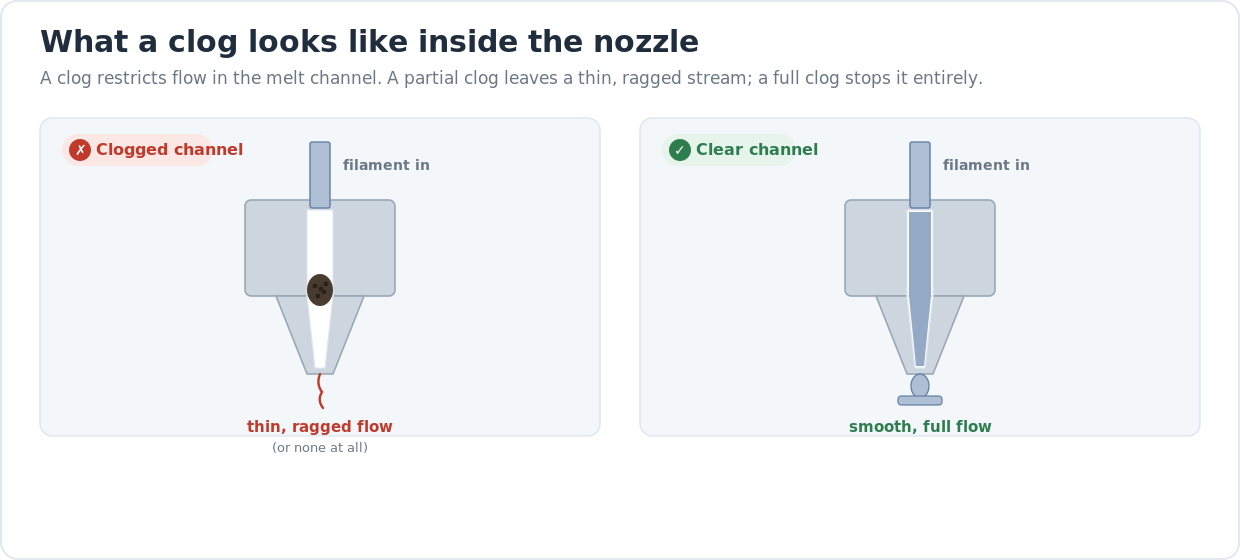
When a nozzle clogs, something inside the melt channel is blocking or restricting the plastic on its way out — burnt filament, dust pulled in with the spool, a chunk of a previous colour, or filament that softened too early and jammed. The hero diagram above shows the two cases side by side: a partial clog narrows the channel so only a thin, ragged stream escapes (that’s the under-extrusion you see), and a full clog blocks it entirely so nothing comes out.
That’s why the fixes below start with clearing the channel and end with replacing parts. Work the list in order and re-test after each step — most clogs are gone after a cold pull or two, and you’ll have wasted nothing. Disassembling a hot end and buying parts is the last resort, not the first move.
How a cold pull actually clears the channel
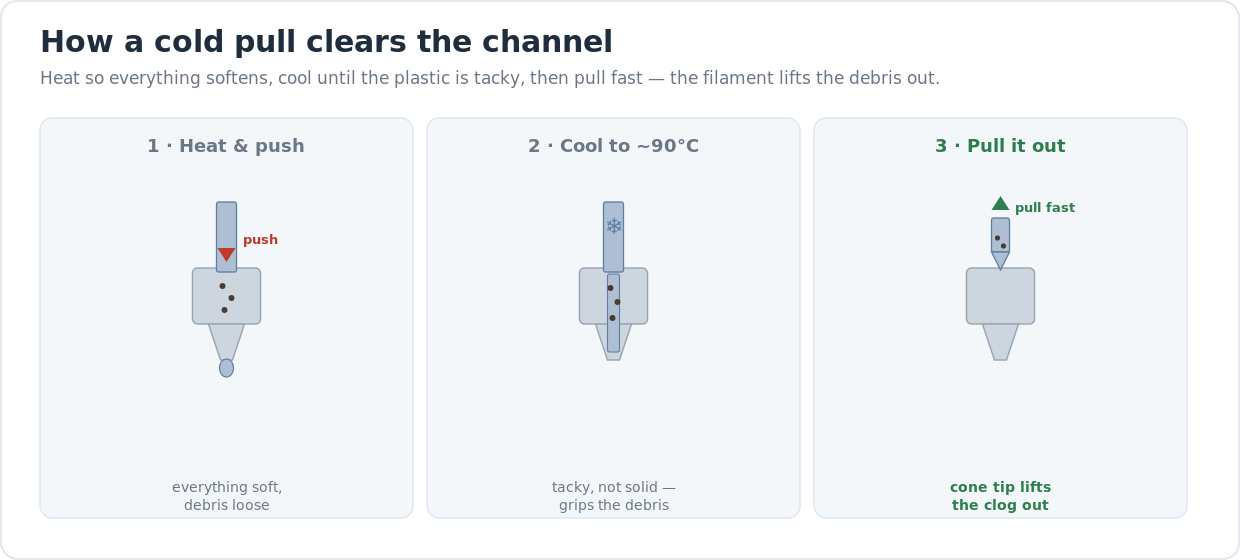
The cold pull works because partly cooled plastic is tacky and strong enough to grab the debris around it, but the channel isn’t fully solid yet. You heat the hot end so everything softens, let it cool into that tacky window, then yank the filament out in one motion — it lifts the blockage with it and comes out as a cone-shaped plug. Pull at the wrong temperature and it either snaps off (too cold) or stretches thin and leaves the debris behind (too hot). The cone tip is your read-out: dark flecks mean repeat; clean and glossy means you’re done.
When a “clog” is really another problem
Two issues masquerade as clogs and waste a lot of teardowns. The first is wet filament — moisture flashing to steam causes popping and uneven flow that looks exactly like a partial clog, so dry the spool and re-test before you take the hot end apart. The second is stringing from uneven flow: a partial clog drools during travel and leaves hairs, so if you’re chasing strings, read why your print is stringing — clearing the nozzle is one of the fixes there too.
This is also a buying signal
A printer that clogs constantly is often a cooling or hot-end design problem you’ll fight forever, not a one-off. All-metal hot ends (no PTFE liner in the melt zone) handle high temperatures without the charred-Teflon jams that plague budget Bowden machines, and a well-cooled heat break stops heat creep before it starts. If you’re tired of teardowns and shopping for something that just prints, our honest desktop 3D printer buyer’s guide covers which machines run clean without a maintenance habit.
Last updated
Reviewed 2026-06-23. Cold-pull temperatures, nozzle-replacement prices, and material ranges above are starting points across the current FDM machines we cover — your filament’s spool label and your hot-end type always win if they disagree. If clogs keep returning after a clean nozzle, the cause is upstream: heat creep, a degraded PTFE liner, or wet filament.