Why Is My 3D Print Cracking and Splitting? Cheapest Fixes First
A crack along the layer lines means the layers never welded together. Fix it by raising the temperature and cutting the cooling first, before you blame the filament or the printer.
Try these in order (cheapest first)
- Raise the nozzle temperature 5–10°C — Free
- Turn the part-cooling fan down — or off for ABS and ASA — Free
- Dry the filament if it has been open a while — Free–$50
- Slow the print down so each layer stays warm longer — Free
- Block drafts or enclose the printer for high-temp materials — Free–$60
- Widen the line or lower the layer height for a bigger weld — Free
Step by step
Step 1: Raise the nozzle temperature first
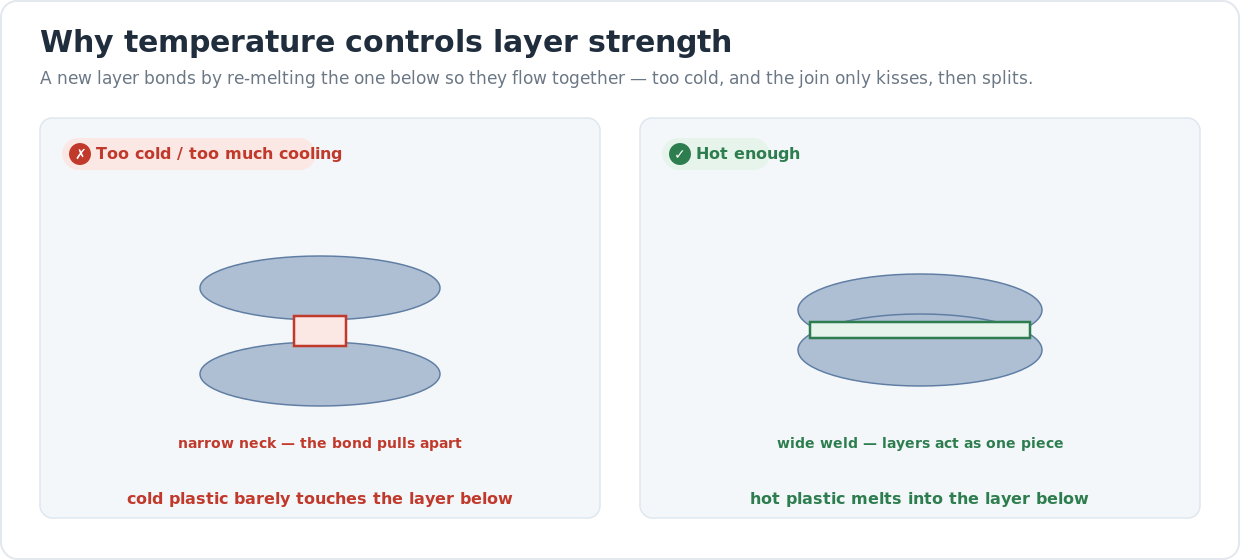
Layer separation is, nine times out of ten, a heat problem — the plastic was too cold to melt into the layer below. Raise the nozzle temperature by 5°C, reprint a tall test piece, and see if the crack moves or disappears. Keep nudging up in 5°C steps until the layers hold, staying inside the range printed on the spool. The best way to find the number is a temperature tower — one model that prints a range of temps in stacked blocks, so you can snap each block and see which one bonds. Run hotter than you would for a pretty surface; strength wants heat.
Step 2: Turn the part-cooling fan down
The part-cooling fan blows air on the plastic the instant it lands, and for layer strength that is the enemy. PLA tolerates lots of fan because it bonds at low temperatures, but ABS, ASA, polycarbonate, and most nylons crack the moment you cool them too fast — the surface freezes before the next layer can melt into it. For those materials, drop the fan to 20–30% after the first few layers, or off entirely. If your cracks show up on ABS or ASA and the fan is running at 100%, that single change often fixes the whole print. Keep enough fan for clean bridges and overhangs, no more.
Step 3: Dry the filament if it has been open a while
Plastic that has sat out absorbs water from the air, and wet filament cannot bond cleanly. As the moisture hits the hot nozzle it flashes to steam, leaving tiny voids and a foamy, weak extrusion that never welds properly to the layer below. The tells are a faint hiss or popping at the nozzle, a rough furry surface, and brittle prints that snap along the layers. Nylon, PETG, PC, and TPU drink water fastest; PLA and ABS are slower but not immune. Dry the spool in a filament dryer or a low oven and reprint before you change any other setting.
Step 4: Slow the print down
Speed works against layer bonding because it gives each layer less time to fuse before the head moves on. The faster you print, the more the previous layer has cooled by the time the new one lands on it. If raising the temperature helped but didn't fully fix it, drop the print speed by 20–30% and reprint — the layer below stays warmer and softer, so the two weld instead of stacking cold. This matters most on tall, thin parts where each layer is a quick loop and cools almost immediately. Slower and hotter is the classic recipe for strong parts.
Step 5: Block drafts and enclose the printer
High-temperature plastics need to cool slowly and evenly, and a cold draft from an open window, a doorway, or an air-conditioning vent will chill one side of the print and crack it along the layers. ABS, ASA, polycarbonate, and nylon all want a warm, still pocket of air around them. You don't need an expensive enclosure to test this — a cardboard box over the printer, or a clear tote with the lid on, traps enough heat to make the difference on a small part. Just keep anything flammable away from the hot end and never enclose the printer's own power supply.
Step 6: Widen the line or lower the layer height
If temperature, cooling, drying, and speed are all dialed in and the part still splits under load, give the layers more material to bond with. A wider extrusion width — set it to 110–120% of the nozzle diameter in your slicer — lays down a fatter bead that overlaps the layer below more generously. A thinner layer height (keep it at or under 75% of the nozzle diameter, so 0.2mm or less on a 0.4mm nozzle) does the same by pressing each layer harder into the last. Both trade a little print time for a noticeably stronger, more crack-resistant wall.
Frequently asked questions
- What is the difference between cracking and warping?
- They have opposite causes. Cracking, or delamination, is the layers pulling apart along a horizontal line because they never fused — a bonding failure inside the wall. Warping is the whole print contracting and curling up off the bed, usually lifting at the corners, while the layers themselves stay intact. If the part splits along a clean layer line, it's cracking; if the corners lift and the base rounds up, it's warping. Both come from cooling, which is why an enclosure helps each.
- Why does ABS crack so much more than PLA?
- Because ABS contracts hard as it cools and bonds only at high temperatures. When the surface of a layer freezes before the next one lands, the two never weld, and ABS's strong contraction then pulls that weak join apart. PLA bonds at much lower temperatures and barely shrinks, so it forgives fast cooling and open-air printing. With ABS and ASA you have to print hot, run almost no part-cooling fan, and keep the printer enclosed and free of drafts, or it will crack along the layers.
- Can wet filament really cause layer separation?
- Yes, and it is one of the most missed causes. Filament absorbs water from the air, and when that moisture hits the nozzle it boils into steam, leaving voids and a weak, foamy extrusion that can't bond to the layer below. The result is a print that looks rough and snaps cleanly along the layers. Nylon, PETG, PC, and TPU are the thirstiest. If a spool has been open for weeks, dry it in a filament dryer or low oven before assuming your settings are wrong.
- What temperature should I print at to stop layer separation?
- Stay inside the range on the spool, but lean toward the hot end of it for strength. PLA typically bonds well at 200–220°C, PETG at 235–250°C, and ABS at 240–260°C, though every filament and hot end differs. Rather than guess, print a temperature tower and snap each block — the lowest temperature that doesn't split is your number. Remember that the prettiest surface temperature and the strongest bonding temperature aren't always the same; for load-bearing parts, choose strength.
- My print cracked days after it came off the printer. Why?
- A delayed crack usually means the layers were weakly bonded all along and a little stress, a temperature swing, or internal contraction finished the job. ABS and ASA are notorious for this because they keep contracting as they fully cool and react to ambient temperature changes. The fix is the same as for cracks that appear during printing — print hotter, cut the cooling, dry the filament, and keep the part out of cold drafts so the layers weld strongly enough to survive handling and use.
Cracking means the layers never welded
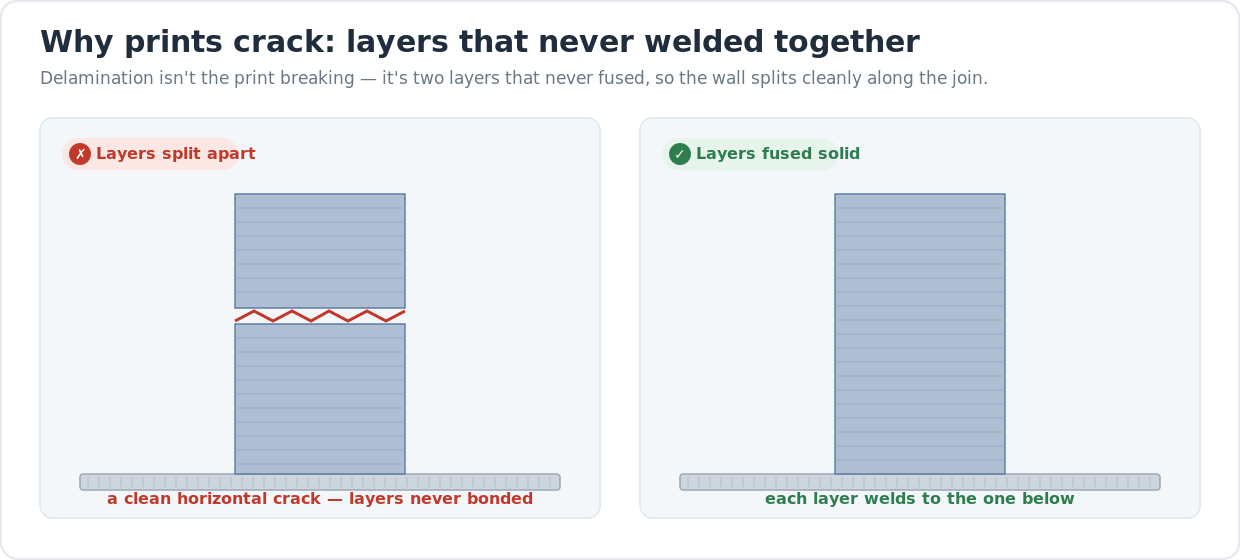
A 3D print cracks or splits along the horizontal layer lines when the layers never fused into one piece. The hero diagram above shows it: on the left the wall has pulled apart along a clean, straight crack; on the right every layer welded to the one below. The plastic itself is fine. What failed is the bond between layers — the new layer cooled before it could melt into the one underneath it.
That single fact points every fix in the same direction: keep the plastic hot enough, long enough, for each layer to melt into the last. Almost everything that causes cracking is something that steals heat too early — a temperature set too low, a part-cooling fan running too hard, moisture flashing to steam, a print racing along too fast, or a cold draft chilling one side. Work the list in cheapest-first order and change one thing at a time, or you won’t know which fix actually held the layers together.
Why hot plastic bonds and cold plastic splits
A layer doesn’t just sit on top of the one below — it re-melts the surface underneath so the two flow together and cool as a single mass. That re-melting is what gives a print its strength across the layers. When the plastic is too cold, or the fan freezes the surface, or steam from wet filament gets in the way, the new layer only kisses the old one. The join is a thin neck instead of a wide weld, and any stress pulls it straight apart. Raise the heat and slow things down, and that thin neck becomes a solid bond.
This is also why the material matters so much. If you’re choosing what to print a strong part in, our PLA vs PETG vs ABS comparison breaks down which plastics bond easily and which demand a hot, enclosed, draft-free setup to hold their layers.
When it’s the filament, not the settings
If you’ve raised the temperature and cut the fan and the layers still split — especially with a rough, furry surface or a faint hiss at the nozzle — suspect moisture before you touch anything else. Filament absorbs water from the air, and wet plastic can’t weld cleanly no matter how hot you run it. Our guide to drying wet filament walks through the oven and filament-dryer methods and the temperatures for each material. It’s the single most overlooked cause of weak, cracking prints.
The same cold-air problem that cracks layers also lifts corners off the bed, so if your prints are both splitting and curling up at the base, fixing the warping usually solves the cracking at the same time — both come down to keeping the print warm and the air around it still.
When to stop tuning and look at the printer
Most cracking is fixable for free with temperature, cooling, and drying. Where it stops being a settings problem is on machines that can’t hold a high enough temperature or keep the build area warm — an open-frame printer in a cold garage will fight you on every ABS print no matter how you tune it. A printer with a stable, well-insulated hot end and the option to enclose the build volume makes strong, crack-free parts far easier.
If you’re deciding whether your machine is the limit or your settings are, our honest desktop 3D printer buyer’s guide covers which printers handle high-temperature, draft-sensitive materials well and which are happiest sticking to PLA.
Last updated
Reviewed 2026-06-30. The temperature ranges above are typical starting points across the current FDM machines and common filaments we cover — your spool’s printed range and your printer’s documentation always win if they disagree. A dedicated guide to under-extrusion and weak walls is in progress and will be linked here when it publishes.